
Introduction
The Demand Aggregation feature is designed to optimize your component procurement by combining multiple Bills of Materials (BOMs) from different projects. This consolidation can significantly enhance purchasing power and reduce costs.
Automation
- Automatic Identification:
- The platform uses advanced algorithms to automatically identify shared components across the uploaded BOMs.
- This process reduces manual effort and ensures that no shared component is overlooked.
- Potential Savings:
- The system calculates potential savings by comparing the cost of ordering shared components together versus separately.
- This information is displayed in a summary format, providing a clear view of cost-saving opportunities.
How to Use Demand Aggregation
-
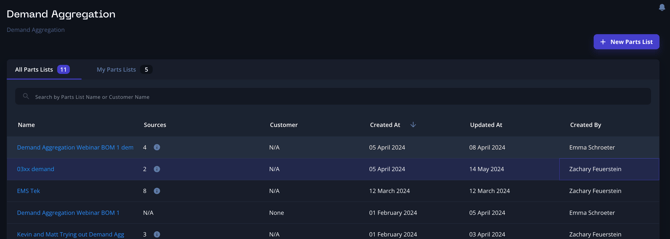
Access Demand Aggregation: ◦ Click on the "Demand Aggregation" button in the left side navigation bar in Breadboard.
-
Create a New Parts List: ◦ Click "New Parts List" to create an aggregated pricing document.
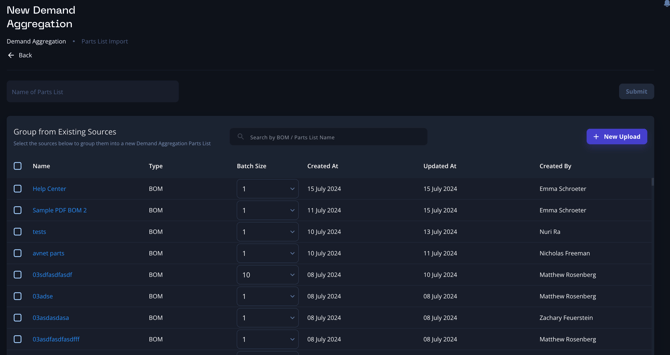
- Select or Upload BOMs: ◦ You can select existing BOMs that have been uploaded or upload a new one
Note: You’ll have to select a specific batch size to use this feature. This ensures you get the most accurate pricing based on the quantities required.
4. Combine BOMs: ◦ This functionality will combine the selected BOMs into one large parts list. The interface will look similar to the individual BOM process you are familiar with.
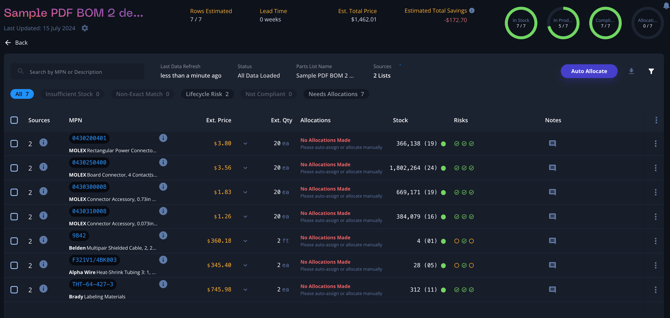
5. View and Allocate Parts: ◦ The combined parts list will show which BOMs each part appears in (see source). You can then allocate parts as normal.
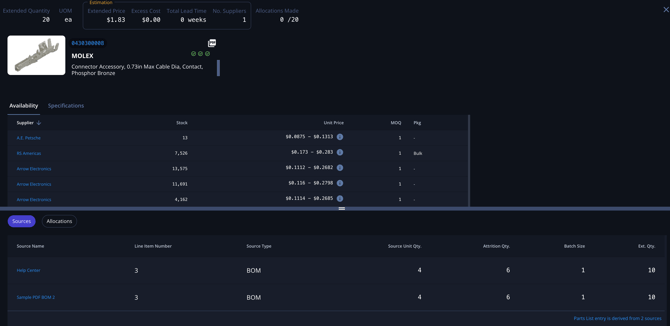
- Export Information: ◦ Once you have reviewed and allocated the parts, you can export the information.
By following these steps, you can effectively use Breadboard's demand aggregation functionality to handle complex packages and ensure you are finding the best pricing for your customers. This feature streamlines the process of generating aggregated pricing across multiple BOMs, providing you with a comprehensive and efficient tool for managing your components.
Best Practices
- Regular Aggregation: Frequently combine BOMs from ongoing and upcoming projects to continuously leverage bulk ordering benefits.
- Review Suggestions: Regularly review the suggested savings and shared components to make informed procurement decisions.
- Supplier Negotiations: Use the aggregated demand data to negotiate better pricing and terms with suppliers.