
Overview
Breadboard has been intentionally built to be customizable to your needs. One of the ways we achieve this is through our Export Templates, which allow you to generate detailed reports that look and feel exactly as you need.
How to Create an Export Template
- Navigate to the Settings: ◦ Go to the Export Templates section in the Breadboard platform.

2. Create or Select an Export Template: ◦ You can either create a new export template or select an existing one that suits your needs.
3. Customize Your Template: ◦ Add the columns and data points you need. ◦ Insert custom formulas and calculations as required.
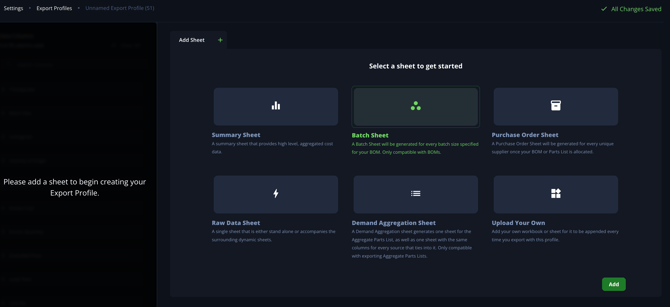
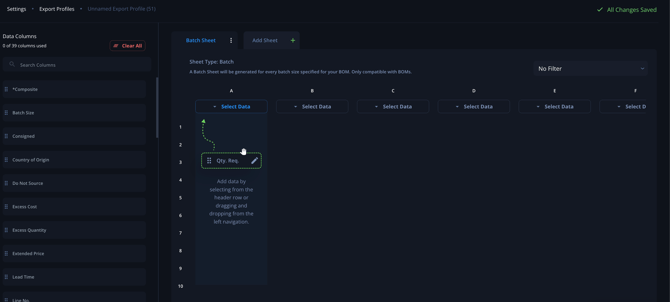
- Save and Apply Template: ◦ Save your customized template for future use. ◦ Apply the template to your current BOM or project.
How to Generate Detailed Reports
- Select the Data for Reporting: ◦ Choose the project, BOM, or parts list you want to generate a report for.
- Apply Export Template: ◦ Apply your customized export template to the selected data.
- Generate the Report: ◦ Click on the export or generate report button. ◦ Breadboard will create a detailed report based on your customized template.
- Review and Adjust: ◦ Review the generated report. ◦ Make any necessary adjustments directly in the report or by modifying your export template.
- Save or Export Report: ◦ Save the report within Breadboard for future reference. ◦ Export the report to your preferred format (e.g., Excel, PDF).
Tips & Tricks
One handy trick about this feature is that the exports can be built on formulas to leverage any existing quote templates you might use.
- Labor and Margins in Excel:
- If your labor and margins are calculated in Excel, you can easily integrate these calculations into your Breadboard export templates.
- This removes the need for copying and pasting data back and forth, streamlining your workflow.
For assistance in setting this up, reach out to our support team via support@breadboard.com or use our support chat within the Breadboard platform. We’re here to help you get the most out of your Breadboard experience.
Curious what each of the fields mean? Checkout the Breadboard Glossary!