
Breadboard’s robust integration with suppliers provides comprehensive pricing and availability data for electronic components. However, there may be instances where you need to add manual bids. This could be due to a supplier not being integrated with our system, unique pricing agreements, or specific inventory circumstances. Adding manual bids ensures that all potential sources and costs are accounted for, allowing for accurate and competitive quoting.
Benefits of Adding Manual Bids
- Comprehensive Quoting: Including manual bids ensures that all potential suppliers and costs are considered, providing a more competitive and accurate quote.
- Flexibility: Manual bids allow you to account for unique supplier agreements or special circumstances that may not be captured through standard integrations.
- Enhanced Supplier Relationships: By adding manual bids, you can maintain and leverage relationships with suppliers who may not be integrated into the system but offer valuable pricing and availability.
Steps to Add a Manual Bid
1. Access the Relevant Project
- Navigate to the main dashboard and select the project for which you need to add a manual bid.
- Open the project to view its detailed breakdown of parts and line items.
2. Select the Part/Line Item
- Identify the specific part or line item that requires a manual bid.
- Click on this part to open its detailed view, where you can see existing pricing and availability data.
3. Initiate a Manual Bid
- Within the part’s detailed view, locate the option for adding a manual bid. This is typically found under an “Add Bid” or “Manual Bid” button.
- Click on this button to open the manual bid entry form.

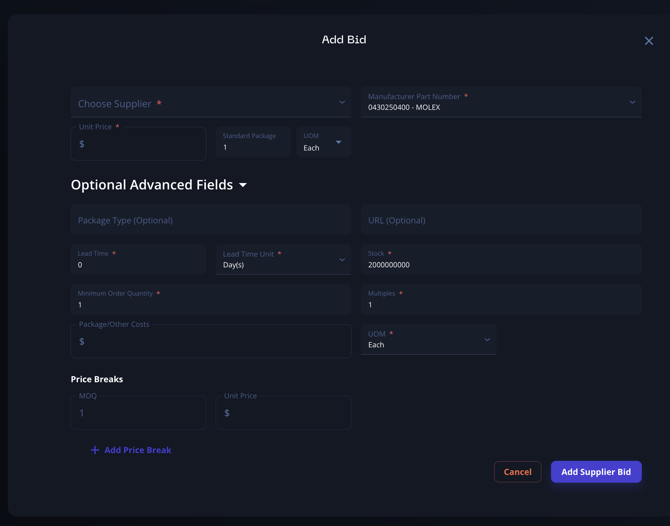
4. Enter Bid Details
- Supplier Information: Enter the name of the supplier providing the bid. If this is a new supplier, ensure you have all necessary contact details.
- Pricing Information: Input the cost per unit for the part. Ensure this is accurate and reflects any agreements or discounts.
- Availability Information: Enter the quantity available from this supplier and any relevant lead times. This helps in understanding the feasibility of sourcing from this supplier.
- Additional Details: Include any other pertinent information such as minimum order quantities, delivery terms, and payment conditions.
5. Save and Verify
- After entering all necessary details, click “Save” to add the manual bid to the part.
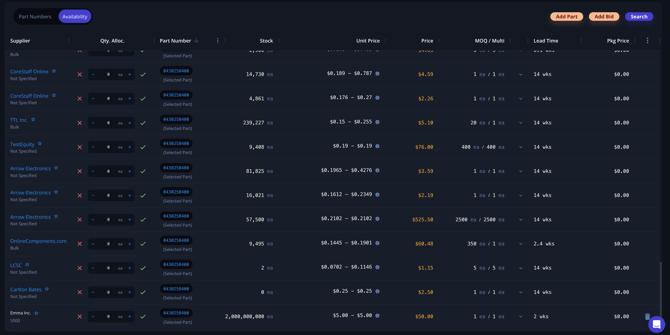
- Verify that the bid has been added correctly by checking the part’s availability view. Ensure all information is accurate and complete. You can always delete a bid here too.
Best Practices for Adding Manual Bids
- Accurate Information: Ensure all information entered is accurate and up-to-date. This includes pricing, availability, and supplier details.
- Regular Updates: Regularly review and update manual bids to reflect any changes in supplier terms or market conditions.
- Detailed Notes: Include detailed notes about any specific terms or conditions associated with the manual bid. This provides context and helps in making informed procurement decisions.
- Verify and Confirm: Always verify and confirm manual bids with the supplier to ensure that the information is correct and the bid is still valid.
Troubleshooting and Support
- Contact Support: If you encounter any issues while adding manual bids or need assistance with supplier integration, contact Breadboard’s support team. They can provide guidance and help resolve any problems.
- Regular Training: Ensure your team is regularly trained on how to add and manage manual bids. This helps in maintaining accuracy and efficiency in your quoting process.
By following these steps and best practices, you can effectively add manual bids in Breadboard, ensuring that your quoting process is comprehensive, accurate, and competitive. This capability enhances your ability to source components from a wide range of suppliers, optimizing your procurement strategy and supporting successful project outcomes.