
One of the biggest values Breadboard offers is providing up-to-date pricing and availability information for electronic components. Thanks to our robust supplier integrations, you can access this critical data directly within the platform, helping you make informed procurement decisions quickly and efficiently.
Ways to View Pricing and Availability
There are a couple of primary methods to view pricing and availability information in Breadboard:
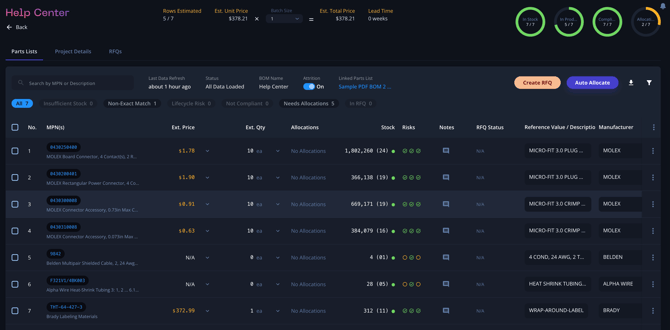
- Clicking into an Individual Part/Line Item:
- Navigate to your project and locate the specific part or line item you are interested in.
- Click on the part or line item to open its detailed view.
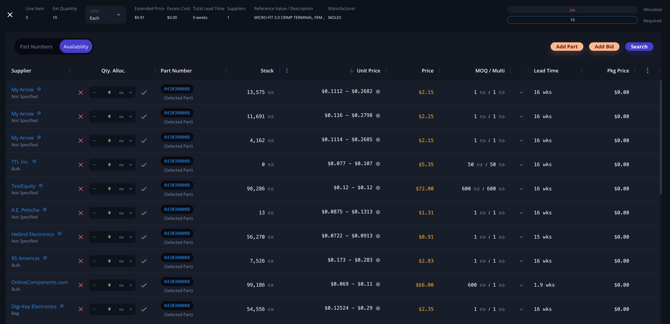
- Here, you will find comprehensive information on pricing, availability, and other relevant details directly sourced from our integrated suppliers.
- Hint: If you click within the Allocation column, this will bring you directly to the pricing and availability for that line item.
- When Searching for a Part:
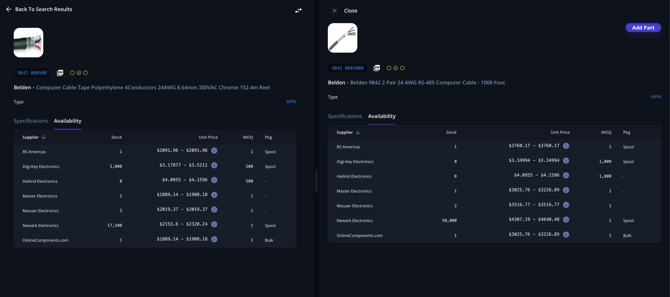
- Use the search function within any project to look up a specific part.
- Enter the part number, partial part number, or description in the search field.
- The search results will display a list of matching parts. Click on the desired part to view detailed pricing and availability information.
Don’t See a Supplier or Your Own Inventory?
If you don't see a particular supplier or your own inventory information, there are a few steps you can take:
- Contact Support:
- Reach out to our support team for assistance in adding new suppliers or integrating your inventory data.
- Our team can help you with the necessary steps to ensure all your preferred suppliers are included in Breadboard.
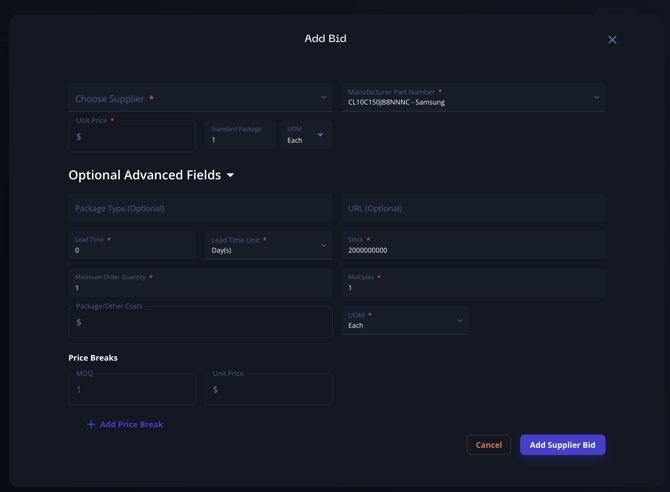
- Add a Manual Bid:
- You can manually add a bid for a part if the supplier information is not automatically available.
- Navigate to the part or line item, and select the option to add a manual bid.
- Enter the pricing and availability details manually to ensure all data is captured and accessible.

Using the Auto-Allocate Feature
While you can always view pricing and availability information individually, Breadboard also offers the auto-allocate feature to streamline your quoting process.
- Starting with Auto-Allocate:
- When you are ready to start quoting the BOM, use the auto-allocate feature to automatically assign suppliers to each line item based on pricing and availability.
- This feature leverages real-time data to suggest the best suppliers, optimizing your procurement strategy.
- Making Modifications:
- After auto-allocation, you can always review and modify the assigned suppliers.
- Click on any part or line item to view the allocated supplier and make changes if needed.
- This flexibility ensures you can fine-tune your quotes to meet specific project requirements or preferences.
Best Practices for Viewing Pricing and Availability
- Regular Checks: Frequently check pricing and availability information to stay updated on market changes and ensure your quotes reflect the latest data.
- Leverage Integrations: Make full use of Breadboard’s supplier integrations to access comprehensive and accurate information.
- Manual Adjustments: Don’t hesitate to add manual bids or adjust supplier allocations to suit your unique needs.
- Utilize Support: Contact Breadboard support for any assistance with integrating new suppliers or resolving data issues.
By utilizing these methods and best practices, you can ensure you have the most current and accurate pricing and availability information at your fingertips, making your procurement process more efficient and effective. Breadboard’s comprehensive data integration capabilities empower you to make informed decisions, optimize your supply chain, and enhance your overall project management.