
In the fast-paced world of electronics manufacturing, there are moments when you need quick access to detailed information, pricing, availability, and specifications for a specific part. Instead of using general search engines like Google, Breadboard offers a streamlined and comprehensive part search feature that integrates directly within your projects. This ensures that all the information you need is right at your fingertips, making your procurement process more efficient and accurate.
Currently, our part search functionality is accessible within any project, allowing you to search for any part from this central location. We are continually working to improve this feature and make it even more accessible and user-friendly.
Benefits of Using Breadboard for Part Searches
- Integrated Search: Since the part search is integrated within your projects, you do not need to switch between different platforms or tools. This saves time and reduces the risk of errors.
- Accurate and Up-to-Date Information: Breadboard’s search function pulls real-time data from a wide range of suppliers, ensuring that the information you access is accurate and current.
- Efficiency: By centralizing the search process within your project, Breadboard eliminates the need for external searches and streamlines your workflow.
- Comprehensive Data: Beyond basic pricing and availability, Breadboard provides detailed compliance, lifecycle, and risk data, enabling you to make well-informed decisions about your component choices.
Quick Part Search Process
1. Access Part Search
To begin a part search, navigate to any existing project on Breadboard. This can be done from the main dashboard or the projects overview page.
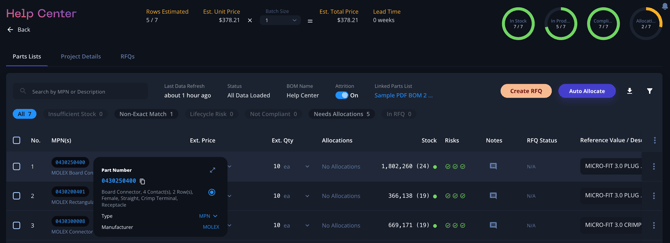
2. Click into a Line Item/MPN
Within the selected project, identify the line item or Manufacturer Part Number (MPN) that you want to search for. Click on this line item to open the details. Don’t worry, you can still use this functionality to search for any part!
3. Select Search
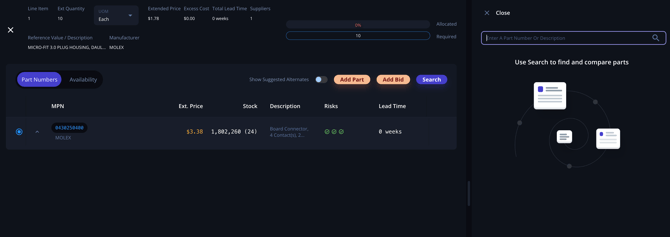
In the details view of the line item or MPN, you will see an option labeled "Search". Click on this option to initiate the part search process.
4. Perform the Search
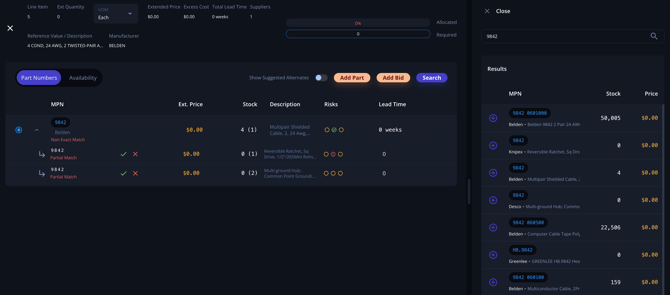
In the search field, enter the part number, partial part numbers, descriptions, or any other relevant information. Breadboard’s search function is robust and can find parts even with partial or incomplete information, ensuring you can locate the part you need quickly.
5. View Pricing and Availability
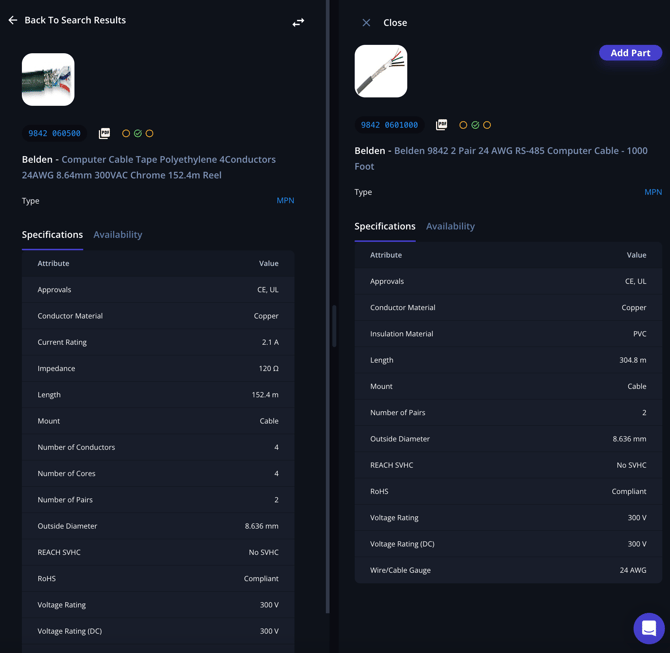
From the search results, click on the part that matches your criteria. This will open a detailed view where you can see comprehensive information, including pricing, availability, compliance data, and more. This detailed information helps you make informed decisions about which parts to use in your projects. You can even compare two parts at the same time!
Best Practices for Using Part Search
- Use Specific Keywords: When searching for parts, use specific part numbers or detailed descriptions to narrow down the results and find the exact component you need.
- Leverage Partial Searches: If you do not have the complete part number, use partial part numbers or keywords. Breadboard’s search function is designed to handle incomplete information effectively.
- Regular Updates: Ensure that your project data is regularly updated to make the search process smoother and more accurate.
- Explore Search Results: Don’t hesitate to explore multiple results to compare different options. Breadboard provides comprehensive data for each part, allowing you to make the best choice based on your project needs.
By following these steps and best practices, you can quickly and efficiently find detailed information about individual parts, ensuring you have the most accurate and up-to-date data for your projects. This feature not only saves time but also enhances the overall accuracy and efficiency of your procurement process.