
Breadboard’s Approach to Supplier Integration
- Direct API Connections: For suppliers who offer API integrations, Breadboard connects directly to their systems. This enables real-time access to pricing, availability, and compliance data, ensuring you have the most up-to-date information when making procurement decisions.
- Data Through Aggregators: Breadboard also supports data from aggregators who compile information from multiple sources. This ensures a comprehensive view of the market and helps in identifying the best suppliers.
- RFQ Responses: For suppliers who do not offer API integrations, Breadboard collects data from RFQ responses. This allows you to maintain relationships with a wide range of suppliers and ensures that you are not limited to only those with advanced technical capabilities.
We recommend including all your suppliers in Breadboard, regardless of how their data is integrated. This ensures that you can leverage the full range of available information and make the best procurement decisions.
Managing Suppliers
Steps to Add a New Supplier
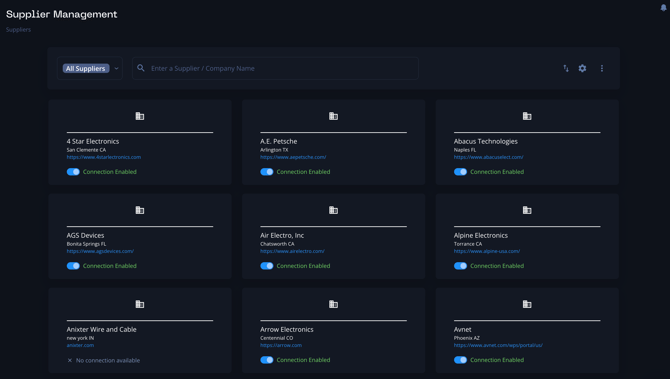
- Navigate to Supplier Management:
- From the main dashboard, click on the "Settings" tab.
- Select "Supplier Management" from the menu.
- Add New Supplier:
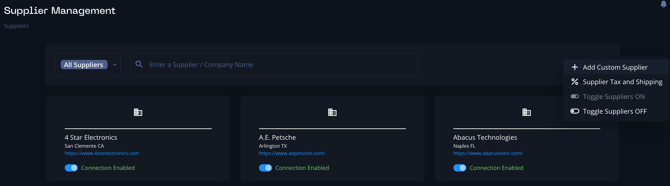
- Click on the "Add Custom Supplier" button.
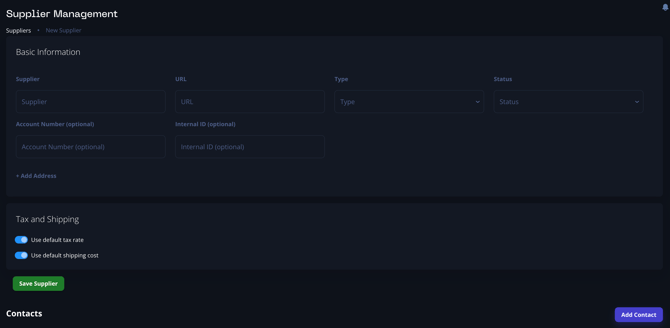
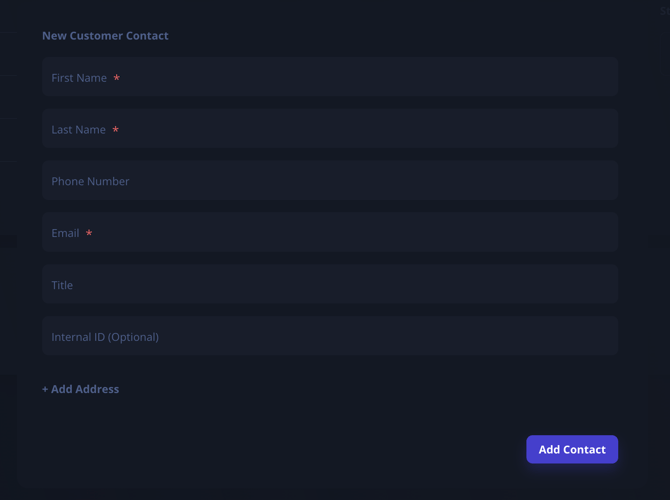
- Fill in the supplier’s name, contact information, and any other relevant details.
- Flip the toggle to “Enabled” to ensure this supplier will be turned on and available for tiering.
- Ensure you include comprehensive contact information to fully leverage the RFQ feature. This includes email addresses, phone numbers, and primary contact persons.
- Save and Verify:
- After entering the supplier details, click "Save".
- Verify that the supplier has been added to your list and ensure all contact details are accurate.
Note: If you need to bulk upload suppliers, feel free to reach out to support@breadboard.com for assistance.
Tiering Suppliers
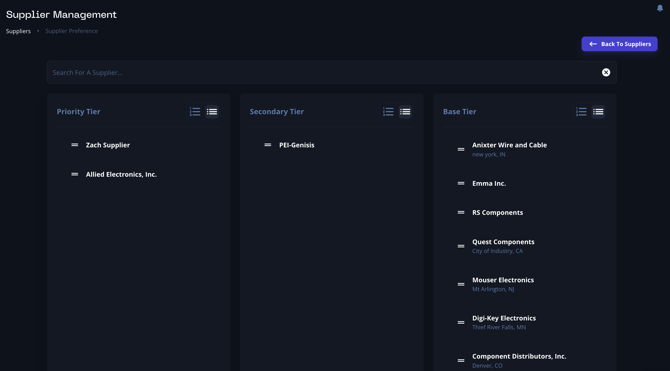
To streamline the quoting process and make it as efficient as possible, Breadboard has created a supplier tiering system. This system allows you to prioritize suppliers based on your existing strategy and preferences, making BOM allocation quick and painless.
- Understanding Supplier Tiers:
- Breadboard categorizes suppliers into three tiers. Each tier represents a different level of priority or preference based on how you define them.
- Auto-Allocation Feature:
- With Breadboard’s auto-allocation feature, you can automatically assign suppliers to each line item on a BOM based on their tier. This ensures that your top-tier suppliers are prioritized for critical components, while lower-tier suppliers are used for less critical items or as backups.
- Managing Tiers:
- To manage your supplier tiers, go to the "Supplier Management" section.
- Drag and drop suppliers between tiers to adjust their priority. This can be done by selecting the supplier and moving them to the desired tier.
- Ensure that each supplier is placed in the appropriate tier to reflect your procurement strategy and optimize your supply chain efficiency.
Best Practices for Supplier Management
- Regular Updates: Regularly update supplier information to ensure that all contact details are accurate and up-to-date.
- Comprehensive Data: Include as much information as possible for each supplier to fully utilize Breadboard’s features.
- Optimize Tiering: Periodically review and adjust your supplier tiers to align with your current strategy and market conditions.
- Leverage Technology: Utilize Breadboard’s direct API connections and data aggregators to access real-time information and make informed procurement decisions.
- Effective Communication: Ensure you have clear and effective communication channels with all suppliers to streamline the RFQ process and address any issues promptly.
By effectively managing your suppliers within Breadboard, you can enhance the efficiency of your supply chain operations, reduce costs, and improve overall procurement performance.